
How to Customize AJ/Videolink IP Camera – OEM Tutorial
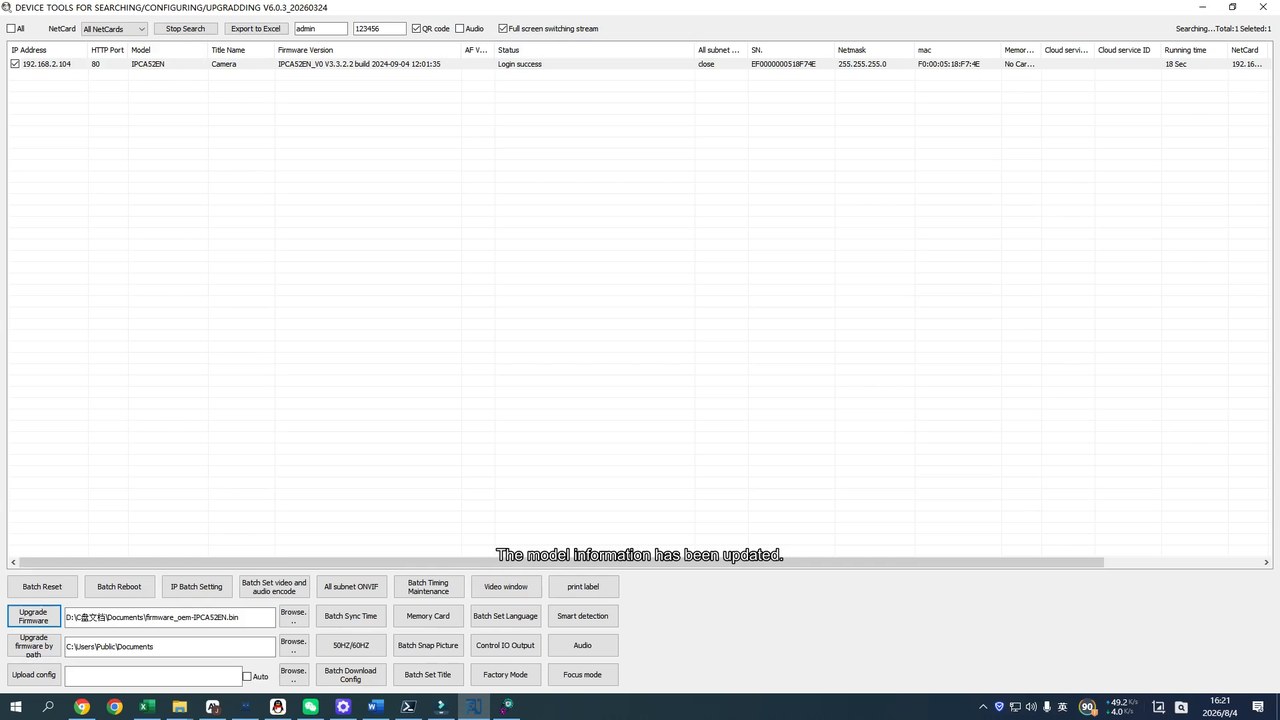
This step-by-step video tutorial shows how to customize AJ/Videolink IP camera with your own brand name, logo,model no,language, light mode and settings
What This Tutorial Covers
Follow these steps to search, configure, and upgrade an IPC module with your own custom firmware profile:
Open Device Tools and search for the device,locate on the device you need customize, click mouse right key choose remote config then select the language convinient you operate
Config you need customize details and save it , batch download config, customize the file save to document as dev file, remember the file location, and select the document or copy it to the desktop or you usually save file.
Open the AJ IPC Custom Tool and set the model (brand) name ,Web logo you need.
Import the file into your custom profile.
Click Generate to create the custom name set.
Open Device Tools again and select the file you just set.
Choose all device you need customize, Click Upgrade.
Monitor the progress status: Starting → Upgrading → Moving → Success.
Done — the model information and custom branding details are updated on the device.
Why OEM Firmware Customization Matters
Buyers evaluating an IPC module manufacturer usually ask the same question: can you actually put my brand on the firmware, not just the box? This tutorial demonstrates exactly that capability — custom model naming, custom language, and a repeatable batch upgrade process — so your camera lineup looks and behaves like it was built in-house, under your own brand.
About the IPC Module Used in This Demo
The device shown in this tutorial (listed as IPCA52 / IPCA52EN in Device Tools) corresponds to our MC-A52 5MP Dual-Light IPC Module. The same OEM firmware customization workflow applies across all AJ IPC/Videolink IPC module lineup — get in touch with your target model and we'll confirm the exact process.
Frequently Asked Questions
Does AJ IP Camera/Videolink ip camera support OEM firmware customization for IP cameras?
Yes. As shown in this tutorial, we provides a dedicated Device Tools + IPC Custom Tool workflow that lets you rebrand IPC module firmware with your own model name, language, and configuration before mass production or shipment.
Can I put my own brand name on IPC module firmware?
Yes — the IPC Custom Tool lets you generate a custom firmware profile with your chosen model/brand name, which is then uploaded to the device during the upgrade step.
What tool is used to customize IP camera firmware and language?
Device Tools utility (for searching, configuring, and upgrading devices) together with the IPC Custom Tool for generating branded firmware profiles. Both are provided to OEM/ODM customers.
Which IPC modules support this OEM customization process?
This demo uses the MC-A52 series module (shown as IPCA52 / IPCA52EN in the tool). AJ IP Camera /Videolink IP Camera module lineup supports the same OEM firmware customization workflow
Do you provide this OEM service for small-batch or sample orders?
Yes, contact our team via the quote page to discuss MOQ and OEM/ODM customization options for your brand.